Lumabooth Dashboard: The real game-changer!
The LumaBooth Dashboard is truly changing the lives of photo booth rental companies
When software is updated, we often look first at the interface, the new name, or the “wow” features highlighted in the marketing materials. But in the case of LumaBooth, the real innovation that deserves the attention of photobooth professionals isn’t just the redesign of dslrBooth or the introduction of new AI features: The real game-changer is the LumaBooth Dashboard.
Lumasoft describes it as a control center accessible via a web browser, capable of creating events, configuring templates, overlays, backgrounds, and sharing options, and then syncing everything to compatible devices.
In other words, we're not talking about just another menu here. We're talking about a change in approach.
Until now, in many photo booth setups, a large part of the preparation was still done directly on the kiosk or on the PC that would be used for the event. With the Dashboard, this approach is beginning to change significantly: you can now prepare your event from a desktop computer in a quiet setting, and then find the configuration already set up on the kiosks.
Finally, a real way to prepare from a desktop computer
This is probably the most important point to remember. The LumaBooth Dashboard is a web-based tool, so it can be accessed from any device with an internet connection.
Lumasoft clearly explains that it allows users to prepare their events without having to be at the kiosk. This means that professionals can finally work from their desktop computers, in optimal conditions, with true convenience when preparing events, rather than having to use the kiosk’s computer for every adjustment.
And in practice, this makes a big difference. Working on a desktop computer isn’t just “more pleasant.” It’s often faster, cleaner, and more logical. You can prepare for your event in the morning at the office, take your time checking the visuals, organizing the settings, and adjusting the backdrops, welcome screens, and sharing options—then leave the kiosks available for their real purpose: heading out into the field and filming.
For a rental company or operator managing multiple services, this represents a major organizational shift. We’re moving away from the “I set things up on the terminal itself” approach and toward a much more professional one: I set things up on my workstation, then deploy them to my operational machines.
The real benefit for a pro: keeping their terminals available
This is where the Dashboard becomes particularly useful for a well-organized rental company.
In the past, if you wanted to set up an event, you often had to use the PC at the kiosk in question directly, or at the very least a machine that was already integrated into your workflow. This partially tied up your equipment. Today, the approach is much more efficient: the office is used for preparation, and the kiosks are used for operation.
And this is crucial as soon as you have two photo booth kiosks in operation. Because, in fact, the Dashboard not only makes preparation more convenient, but it also means you no longer need to tie up a kiosk while you work.
→ You can now handle all the setup on your main computer at home or at the office, while your two kiosks remain available to be taken out into the field, tested, packaged, or put into operation.
For a professional, this is very practical. It means fewer unnecessary steps, fewer connections to reconnect, less time wasted, and, above all, a much smoother workflow when business picks up.
A true synchronization logic
The Dashboard would be interesting, but it would be rather limited if it were used only to configure settings in a web browser… What really makes it valuable is its synchronization feature.
According to the official documentation, the settings configured in the Dashboard automatically sync to connected LumaBooth devices—whether they are Windows, iPad, iPhone, or Mac—provided you are using compatible versions and have an internet connection to retrieve the settings. For Windows, the Dashboard requires LumaBooth for Windows version 8.1 or later.
On Windows, Lumasoft also notes that events can be synchronized across multiple devices using the same fotoShare account. When an event is created, it can upload settings and associated elements—such as templates, backgrounds, and overlays—to the cloud. The developer even explicitly states that it is possible to create an event on your main computer at home and then access it on all Windows devices using the same account.
That's exactly what makes this new product so appealing to professionals. It's not just about convenience. It's about a smarter way of working, where preparation is no longer confined to a single machine.
But running a business involves more than just the software:
We discuss this in our PDF for photo booth rental professionals, which you can find in the shop.
How easy it is to manage your photo kiosks
The Dashboard makes managing multiple stations much easier—and that's exactly what rental companies wanted!

Why? Because you can now set up an event on your desktop computer and then access it on your connected photobooth devices. And for Windows users, Lumasoft confirms that events sync across multiple computers using the same account.
In practical terms, this opens up several very interesting applications.
The first one is the simplest: you set up a performance on your desktop computer, then send it to Terminal A, which is heading to an event this weekend. Meanwhile, Terminal B remains available for another performance, for testing, or for a second setup.
The second use is managing multiple events in a row. The Dashboard lets you create new events, view current and past events, and duplicate a previous event to start from a ready-made template. This is very useful when you need to schedule back-to-back events without having to start from scratch each time.
The third use case—which is very important for professionals—is business continuity. Lumasoft points out that if you’re using just one device, synchronization can already serve as a cloud backup, and that if a problem arises with a computer at an event, you can quickly switch to another machine that will retrieve the synchronized events. For someone operating two kiosks, this approach becomes even more valuable.
That said, let's not exaggerate—the dashboard doesn't do all the work for you, but it does make it much easier to set up, deploy, and secure the use of multiple kiosks. And for a professional, that's already a huge help.
What You Can Prepare in Advance in the Dashboard
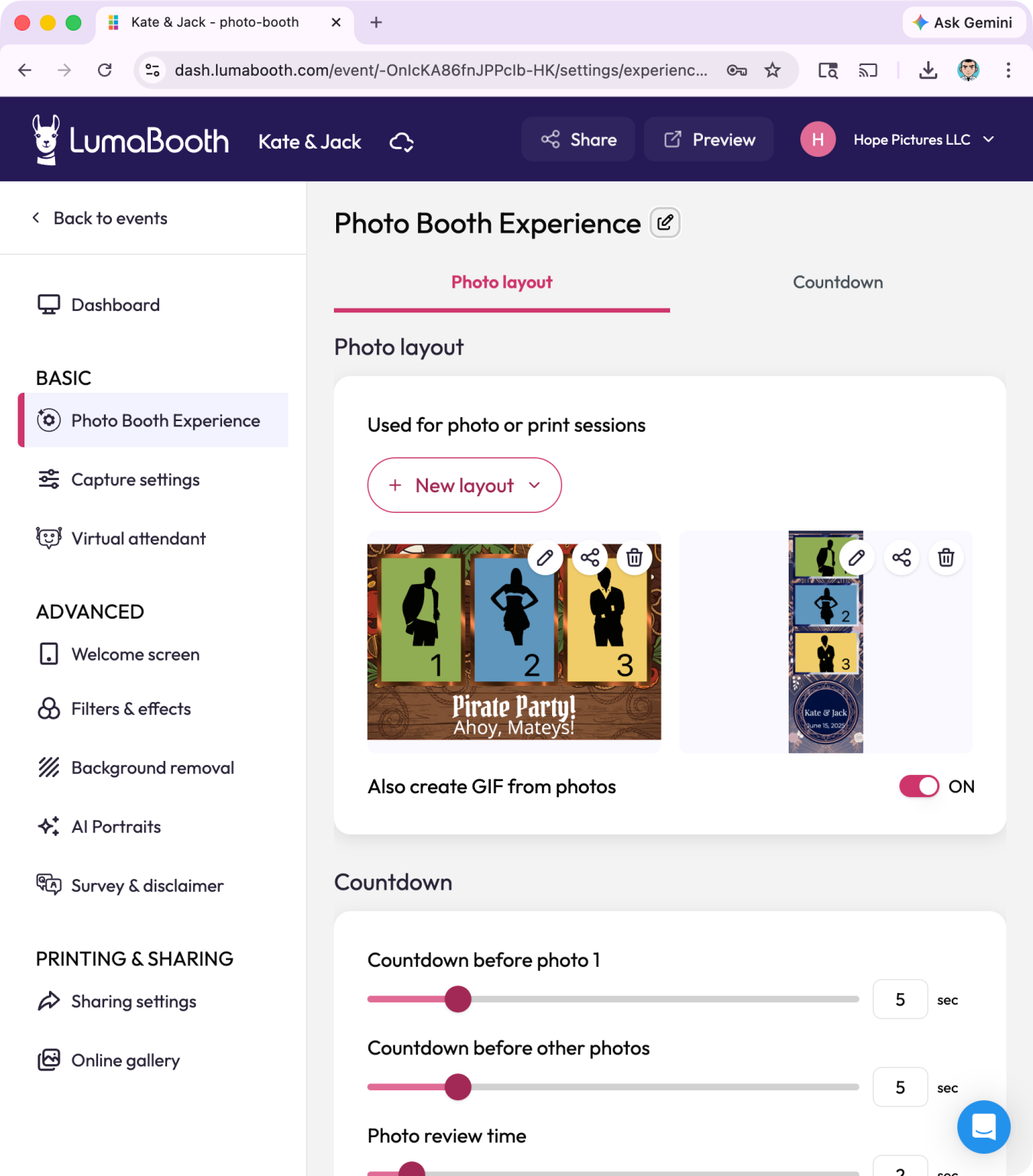
Using the dashboard, you can create an event, choose the type of experience, set the name and date, and then configure the photo or video settings as needed. The types listed in the Lumabooth documentation include Photo Booth, Glam Booth, Background Removal, Mirror Booth, as well as 360 / slow-motion and Video Booth.
When it comes to template design, you can set up the photo layout, choose an existing template, or import your own design; adjust the placement and size of the photos; and then set the countdown timers. You can also enable different modes—such as Photo Booth, GIF, video, or 360—and customize their options.
The Dashboard also lets you customize features that significantly impact the perceived quality of the kiosk: welcome screen, text, custom background, welcome video, filters, effects, beauty filter, AI-powered background removal or green screen, background selection, overlays, and sharing options. Lumasoft also notes that you can configure email, SMS, QR codes, and other sharing methods directly from the Dashboard.
In other words, this isn't just a simple “preset.” It's already a true centralized preparation area.
A much cleaner way of working
The real benefit of the Dashboard for your photo booths isn't just the list of available features—it's the workflow it offers a glimpse into.
Lumasoft, the company that developed the Lumabooth software, emphasizes that it eliminates the stress of on-site setup.
The idea is simple: prepare the templates, overlays, backgrounds, and settings from home or the office, then arrive at the event with a setup that’s already ready to go. The publisher even points out that if there are any last-minute changes, you can open the Dashboard on your phone to adjust certain settings remotely—it’s magic!
For a professional, this means less last-minute preparation, less risk of forgetting something, and fewer last-minute adjustments at the event venue. It also helps structure their work more effectively. When gigs come one after another, it’s often the preparation details that take up time and create mental strain. The Dashboard provides a solution to this problem: it centralizes everything that needs to be prepared and then distributes it to the terminals at the right time.
A real benefit for companies looking to organize themselves
This is probably where innovation becomes strategic. When you start with a single terminal, you can still get by with a somewhat “handcrafted” setup, where everything is done on the main machine. But as soon as the business grows, this approach quickly reaches its limits. The Dashboard takes the opposite approach: it drives the move toward a cleaner, more centralized, and more scalable setup.
For a business looking to grow, this is a real plus: being able to set things up from a desktop computer, keep your terminals available, synchronize events, access your settings across multiple machines, duplicate existing events, and reduce the risk in the event of a PC failure—these are very tangible benefits, not just marketing claims.
And that’s also why this new feature is particularly appealing to Bizbooth customers. A photo booth shouldn’t just be attractive and reliable—it also needs to be part of a modern operating model. The LumaBooth Dashboard clearly fits the bill.
There are still a few conditions you should be aware of, though
For the sake of completeness, it’s important to note that this functionality depends on certain technical requirements. The Dashboard works with compatible devices, including LumaBooth for Windows version 8.1 or later, and the device must have an internet connection to synchronize settings from the Dashboard.
Regarding Windows synchronization between multiple PCs, Lumasoft also notes thatyou must use the same fotoShare account, have an internet connection, have the same version of the software on both computers, and have a valid license.
These aren't flaws, but they are things to keep in mind. The Dashboard is a real step forward, but like any modern cloud-based tool, it requires proper configuration.
In conclusion
The LumaBooth Dashboard is one of the truly major new features since LumaBooth was launched.
Because it doesn't just add a few extra settings. It changes the way services are prepared: It lets you work from a desktop computer, centralize preparation, sync with the terminals, and make managing multiple machines much more streamlined.
If there is one limitation, it is that the app is mainly useful for planning events, since most of the time, event organizers do not have access to an internet connection at the event venue.
And for many professionals, this is probably the most important point: you can finally manage everything from your main workstation, while keeping two photo booths available for use. For that reason alone, the Dashboard is a game-changer, and that’s why we at Bizbooth are renewing our trust in Lumabooth and will continue to offer you this software.